


If your agency is evaluating public safety CAD software, whether for the first time or as a replacement for an aging system, this guide walks through the challenges, the features that matter, and the questions to ask before you commit.
Choosing new CAD software is not a decision to make on feature lists alone. It affects how dispatchers do their jobs every shift, how quickly units get to the scene, and how well your agency coordinates with neighboring departments during large-scale incidents. Take a look at our blog post on computer-aided dispatch if you want a closer look at how it actually works before diving into vendor comparisons. Getting it right the first time saves years of frustration and avoids the cost of a second, disruptive replacement down the road.
Table of Contents
The Challenges Agencies Face Without Modern CAD
Legacy or poorly integrated CAD systems create problems that ripple through an entire agency’s operations:
- Fragmented systems. Dispatch, records management, and mobile data terminals that can’t share data with each other force dispatchers and officers to duplicate work and lose time.
- Delayed response. Manual unit recommendation, slow map refreshes, or systems that lag under high call volume all add seconds and minutes to response times.
- Poor situational awareness. Without real-time location data on units and incidents, supervisors and dispatchers are making decisions with incomplete information.
- Limited interoperability. Agencies that can’t share data with neighboring jurisdictions or other public safety systems struggle during multi-agency incidents.
These issues rarely announce themselves all at once. They show up as recurring complaints from dispatchers, gaps that surface during after-action reviews, or bottlenecks during major incidents.
For many agencies, the real cost isn’t visible until a critical incident stresses the system. A minor delay in unit recommendation during routine calls becomes a serious problem when a dispatch center is handling dozens of simultaneous calls during a severe weather event, a large public gathering, or a multi-jurisdiction emergency. The gap between “the system mostly works” and “the system works when it matters most” is exactly where legacy CAD platforms tend to fail.
What to Look for in Public Safety CAD Software
When comparing platforms, focus on the capabilities that directly affect response time and operational reliability.
Interoperability and Data Sharing
The best CAD systems connect seamlessly with records management systems (RMS), radio networks, and Next Generation 911 (NG911) infrastructure. Look for standards-based integration and a track record of connecting with the systems your agency and neighboring agencies already use.
Take a look at our landing page on Smart City Software to see how that connectivity extends into a wider city operations ecosystem.
Real-Time GPS and AVL Tracking
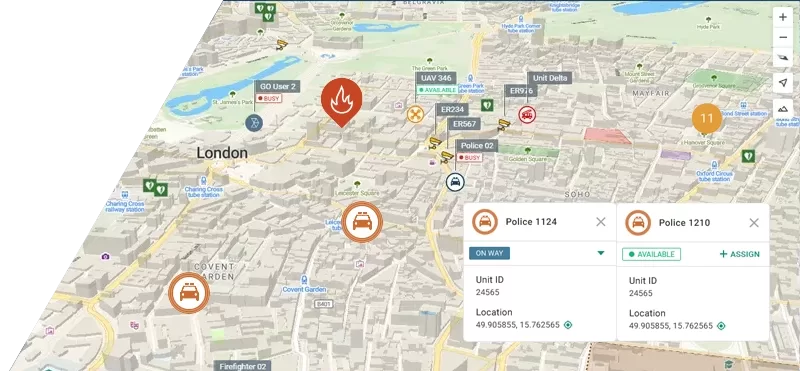
Automatic Vehicle Location (AVL) integrated directly into CAD gives dispatchers live visibility into where every unit is, not just where it was last reported. This is especially critical for agencies coordinating across large jurisdictions or during mutual aid response. Our Smart CAD platform pairs dispatch directly with Tactical AVL, built around this kind of tight integration rather than treating vehicle tracking as an add-on module
Scalability Across Agencies and Regions
A CAD system should perform the same whether it’s supporting a single dispatch center or a shared regional platform serving multiple agencies. Ask vendors directly how their system handles growth in call volume, users, and jurisdictions. Smart CAD, for example, is used across public safety, defense, and industrial deployments in more than 50 countries, which reflects the kind of scalability agencies should expect from a modern platform.
Ease of Use and Training Time
A powerful CAD system that dispatchers can’t learn quickly under pressure isn’t a good fit. Evaluate the interface with actual dispatchers, not just IT staff, and ask about typical onboarding and training timelines.
Reliability and Uptime
Public safety CAD software has to work without exception. Ask vendors about system uptime guarantees, failover capabilities, and what happens during outages or connectivity loss in the field.
Cloud, On-Premise, or Hybrid Deployment
Where the system runs affects cost, maintenance burden, and disaster recovery. Cloud-hosted CAD reduces the hardware and IT overhead on your agency, and typically makes updates and scaling easier. On-premise deployments give agencies full control over their infrastructure, which can matter for agencies with strict data residency or connectivity requirements. Hybrid models are increasingly common, keeping critical dispatch functions on-site while using the cloud for redundancy, reporting, and remote access. Ask vendors which models they support and how failover works if internet connectivity is lost.
Total Cost of Ownership
The sticker price of a CAD system rarely reflects what it actually costs over its lifetime. Factor in licensing structure, hardware requirements, ongoing maintenance and support fees, the cost of future upgrades, and how much you’ll need to spend on training as staff turn over. A lower upfront cost can turn into a higher total cost if the system requires expensive customization or frequent paid upgrades to keep pace with agency needs.
Red Flags: Signs Your Current CAD System Is Holding You Back
If any of the following sound familiar, it’s a strong signal that your current system needs a serious look:
- Dispatchers routinely work around the system instead of with it
- Mapping or unit location data is delayed, inaccurate, or missing
- Your agency can’t easily share data with neighboring jurisdictions
- Adding new units, positions, or agencies to the system is a slow or costly process
- Mobile units in the field don’t have reliable access to CAD data
- Vendor support is slow to respond or the platform hasn’t received meaningful updates in years
Moving Beyond Fragmented CAD Systems
Modern public safety CAD platforms are built to close these gaps rather than paper over them. Integrated solutions that combine CAD with tactical AVL and mobile field applications give agencies a single, connected view of dispatch, unit location, and field operations, instead of stitching together separate tools.
This kind of integration matters most during the moments that matter most: multi-unit responses, mutual aid across jurisdictions, and high-volume call periods where every extra step costs time. Agencies moving from fragmented legacy systems to a connected CAD, AVL, and mobile platform typically see faster dispatch decisions, better situational awareness, and less manual coordination between dispatch and the field.
How Smart CAD Fits This Approach
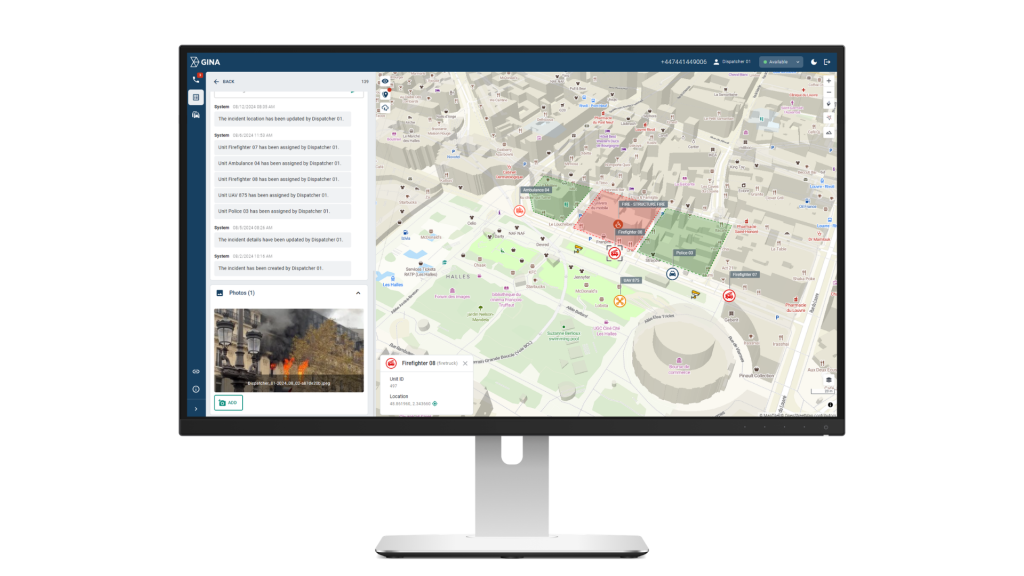
Our Smart CAD platform is built around this same idea. When connected with our Tactical AVL and GINA Mobile and Tablet Apps, dispatchers and field personnel share the same real-time data for full situational awareness, unit positions update live as recommendations are made, and field teams work from the same incident picture instead of a delayed sync. Field units get two-way messaging with dispatch and offline access to maps and incident data when connectivity drops, so situational awareness doesn’t disappear the moment a unit moves out of coverage.
Common Buyer Mistakes to Avoid
Even well-intentioned agencies make avoidable mistakes during a CAD evaluation, mistakes that often only become clear after the contract is signed.
- Choosing on price alone. The lowest bid often hides costs in customization, training, or future upgrades that show up later.
- Skipping input from dispatchers. Decisions made only by IT or command staff frequently overlook day-to-day usability problems that surface after go-live.
- Underestimating integration complexity. Assuming a new CAD will work smoothly with existing RMS, radio, or mobile systems without confirming it in writing.
- Ignoring scalability. Selecting a system sized for today’s call volume without planning for growth in staff, units, or partner agencies.
- Treating the demo as the decision. A polished demo environment rarely reflects real-world performance under full operational load.
A Quick Look at Public Safety CAD Vendors
The public safety CAD space has several established vendors, each with a different focus and deployment approach. Here’s a look at some of them, not a full list of everyone in the market, just a sample to help you get a feel for how the options differ.
| Vendor | Description |
|---|---|
| GINA Software | Incident management and dispatch platform with a modern interface, mobile CAD apps for field teams, and localization into multiple languages, covering fire, EMS, law enforcement, search and rescue, and industrial operations. |
| CentralSquare Technologies | Comprehensive CAD, RMS, and mobile suite widely deployed across North American municipal and regional public safety agencies. |
| Tyler Technologies | Broad public safety platform covering CAD, RMS, and analytics with flexible deployment options and a large install base across US fire and law enforcement agencies. |
| Octave | CAD and dispatch platform built for large, complex multi-agency environments, with strong GIS integration and a wide install base across regional public safety operations. |
| Mark43 | Cloud-native CAD platform serving law enforcement, fire, and EMS, combining dispatch, records management, and multi-agency coordination in a modern browser-based interface. |
| Motorola Solutions Premier One | CAD and RMS platform tightly integrated with Motorola’s communications ecosystem, commonly deployed by large municipal agencies running Motorola radio infrastructure. |
| Zetron | Zetron MAX Dispatch is a modular dispatch and communications console for public safety, transportation, and utilities agencies, with NG911 support and integration across call taking, CAD, and GIS mapping. |
| Omda | Purpose-built EMS platform combining dispatch and clinical data handoff, suited to agencies where patient care documentation is a core operational requirement. |
Conclusion
Public safety CAD software is the backbone of emergency response, and the right platform should reduce friction for dispatchers, give real-time visibility into units in the field, and scale as your agency’s needs grow. Before you commit to a new system, evaluate it against the red flags and criteria above, and keep the common mistakes covered in this guide in mind along the way.
If your agency is exploring a CAD upgrade, Smart CAD may be worth a look for public safety, defense, and industrial teams.
Get in touch with our team to see how it fits your agency’s needs.