

Airport operations management software is at the heart of every well-run airport. It connects teams, speeds up decisions, and makes sure that when something goes wrong, everyone knows what to do and how fast to do it. Yet many airports are still running on outdated tools, disconnected systems, and reactive habits that cost them time, money, and in some cases, safety.
This post walks you through 10 clear signs that your airport has outgrown its current setup. If more than a few of this sound familiar, it’s time to take a closer look at what modern airport operations management software can actually do for you. And more importantly, what it could prevent. If you’d like to dive deeper into the safety side of things, check out our The Ultimate Guide to Airport Safety Management Software.
Table of Contents
10 Signs Your Current Setup Isn’t Working
Most airports don’t fail dramatically. They struggle quietly, until the pressure builds up enough to cause a real problem. Here are the signs to watch for:
- Your teams are working from different information. Security uses one system. Operations uses another. Ground handling works from a spreadsheet. When departments can’t share a single, live view of what’s happening, coordination breaks down and small issues become bigger ones faster than they need to.
- Incidents take too long to resolve. If resolving a security alert or equipment failure still requires multiple phone calls and radio exchanges before the right person is dispatched, your incident workflow isn’t keeping up. Research from Airlines for America shows the average cost of aircraft block time reached $100.76 per minute in 2024. Every unnecessary minute has a direct financial impact on airlines, passengers, and your airport’s reputation.
- You have no early warning system. Your current setup only alerts you after something has already gone wrong. Modern airport operations management software flags unusual activity around restricted zones, fuel farms, or cargo areas before it escalates into a real incident.
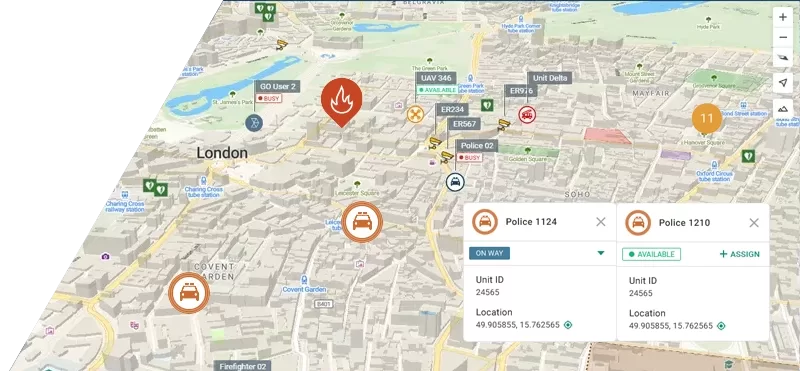
- Your control room can’t see the whole airport at once. If dispatchers rely on radio updates to know where field teams are or what they’re doing, they’re making decisions with incomplete information. Real-time unit positions, active incidents, and task status in real time is no longer a luxury, it’s a baseline requirement.
- Field teams are disconnected from the control room. Staff on the ground should see the same operational picture as the control room on their mobile devices, in real time. If they’re working blind in the field, delays and miscommunication aren’t just possible. They’re predictable.
- Your cameras and sensors work in isolation. CCTV systems, drones, and body-worn cameras are only useful if they’re connected to your operational workflow. If operators have to switch between multiple platforms to monitor the airport, critical seconds are being lost every single time something happens.
- Post-incident reporting is manual and time-consuming. If your team is still piecing together incident reports from memory and handwritten notes, that’s both a compliance risk and a missed opportunity for improvement. Automated logging isn’t just nice to have, it’s essential for audits, meeting regulatory requirements, and long-term security planning.
- When an incident hits, nobody knows who does what. A security alert is triggered in the cargo area. The control room picks it up. But who’s closest? Who’s already assigned? What’s the protocol? If answering those questions requires three phone calls and two radio channels, the problem is already bigger than it needs to be.
- You can’t identify patterns in your incidents. Individual incidents are visible. Trends across incidents often aren’t. If you can’t easily answer where most security alerts occur, which equipment fails most often, or whether delays cluster around specific gates or shifts, you’re missing information that could prevent the next problem before it happens.
- New staff take too long to get up to speed. Every airport relies on people. But if your tools are complex, disconnected, or poorly documented, new team members take weeks to operate independently. That’s a risk especially during busy periods when there’s no time to hand-hold.
What Airport Operations Management Software Should Actually Look Like
The numbers make it clear: this is not a niche market. The global market for airport operations management software reached approximately $9.2 billion in 2024 and is projected to grow to $20.5 billion by 2033, at a CAGR of 9.1 %. That pace of growth reflects a simple truth. Airports around the world are under pressure to modernize, and the demand for integrated digital solutions is accelerating fast.
Yet around 65% of airports have still only adopted basic digital solutions. Fully integrated platforms that connect operations, safety, and incident management in a single workflow remain the exception rather than the rule. Most airports are using a patchwork of systems that don’t talk to each other properly and that gap shows up in response times, reporting quality, and ultimately in safety.
What airport teams actually need is a platform that brings operational control, safety management, and incident response together in one place. Not three systems that loosely talk to each other. One unified workflow where security, operations, and emergency teams all work from the same live information, whether they’re in the control room or on the ground. The airports that have made this shift aren’t just more efficient. They’re more resilient. And that’s what separates airports that react to problems from airports that prevent them.
Practical Checklist
| Feature | Why it matters |
|---|---|
| Single operational picture | All teams such as security, operations, emergency work from the same live data. |
| Real-time incident workflow | Events are captured, assessed, and assigned in one place without manual handoffs. |
| Automated alerts & geofencing | Teams are notified before unauthorized access or unsafe movements escalate |
| Integrated video & surveillance | CCTV, drones, and body-worn cameras connected directly to the operational platform. |
| Mobile apps for field teams | Field staff see the same picture as the control room and can act without extra radio traffic. |
| Automated reporting & audit logs | Incident data is logged automatically. No manual reconstruction after the fact. |
| Pattern recognition & analytics | Recurring issues become visible so teams can adjust plans before problems repeat. |
| Scalability & integration | Works with existing systems and grows with your airport’s needs. |
Not every platform will tick all these boxes. But the more gaps you find during evaluation, the clearer it becomes where your current setup is falling short. If you’ve been nodding along to the signs in the first section of this post, the checklist above is a good way to start putting a name to those gaps and Smart CAD by GINA is built to close them.
How Smart CAD Closes the Gap
Every airport faces the same core challenge: too many moving parts, too little time, and too much at stake when something goes wrong. Smart CAD by GINA was built especially for this environment. It’s not a generic operations solution adapted for airports. It’s a platform designed from the ground up for teams where decisions happen in seconds and the space for error is close to zero.
When an event is logged, whether a security breach, medical emergency, or technical failure, it’s captured, assessed, and assigned within a single workflow. Dispatchers see who is available, what is already impacted, and which actions have been taken. Field teams get the full operational picture on their mobile devices. The time from detection to first response shrinks. So does the disruption.
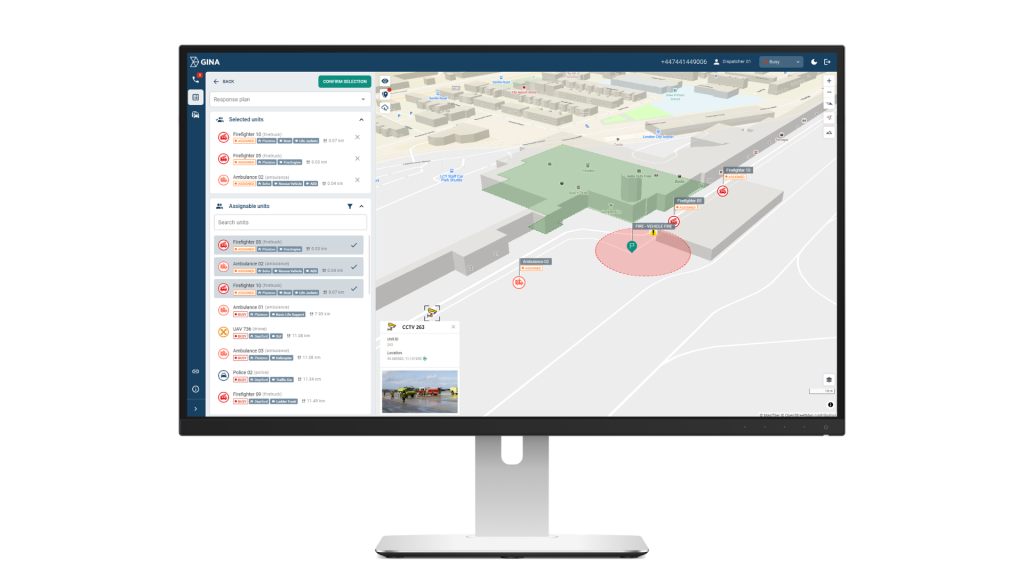
This is exactly what the control room sees during a live incident. On the left, dispatchers have a full list of available and assigned units such as firefighters, ambulances, police, drones with their status, equipment, and distance from the scene. The incident is marked on the map, the geofenced zone is visible, and every unit’s position updates in real time. The integrated CCTV feed pulls in live footage directly from the nearest camera, so the dispatcher doesn’t need to open a separate system to see what’s happening on the ground. This is what effective airport operations management software looks like in practice. Everything needed to make a fast, informed decision in one place.
Over time, the data Smart CAD captures become one of the most valuable tools in your operation. Patterns in incidents, delays, and equipment issues become visible so teams can adjust patrol routes, maintenance schedules, and contingency plans early, before minor problems turn into safety or security incidents. That’s the difference between reactive airport operations management and a truly proactive one.
Is Your Airport Ready to Make the Shift?
The airports performing best right now are the ones that have invested in the right airport operations management software integrated, data-driven platforms that connect teams, speed up decisions, and prevent problems before they escalate. The technology is there. The business case is clear. And the cost of not modernizing is almost always higher than the cost of the investment itself.
For a deeper look at how software supports airport safety specifically, take a look at Airport Operations Management software.